Browsing the archives for the testing tag.

There’s No Time for That! – Testing the Untestable

work safe

As I said earlier, I wanted to talk about other aspects of an event described by Matt Terry about us fixing a bug using a test first mentality.

If you look closely at his retrospective, you’ll notice a problem. Let me give you a hint. Look at the phrase, “The last thing we did was wire up our new methods in the appropriate places.” Got it? NO? Consider how that fits in temporally (time-wise) with the declaration that, “As you’d imagine, now our tests are passing.”

If you’re looking closely, we were actually writing tests against the wrong class. If we had written the tests against the right class, then there would be no need to wire things up. I didn’t see it either at first.

Enough dancing around the point. Here’s some concrete information. The scheduler uses reminders to schedule when an Android alarm or notification needs to occur. There are a few different types of reminders and that’s only important because I use a factory to build the reminders and their sub structures.

Where are the tests? I was testing the factory’s ability to build the correct structure, so that’s where I naturally started adding tests. I ended up duplicating logic for the scheduler in these tests. This turned out to be a problem in an earlier feature when I changed how the reminders were used and didn’t add them to the scheduler until I started system testing. It follows then that I should bring the scheduler in to the tests. That way when I change the way the reminders need to be used, the scheduler will change along side. And we won’t have an, “Awe, crap,” moment where we realized the reason it’s not working is because we only half solved it.

Why didn’t I test the scheduler? Because it was coupled to three things. I used the Android Alarm Manager, the Android Notification Manager, and time. Yes, Virginia, you can be coupled to time. I can uncouple the time at this level the same way I did at the reminder level: pass it in as a method parameter. But where does this stop? In my case I would choose to new up a GregorianCalendar at the Android Activity level. This is also where I would wrap the AlarmManager and NotificationManager so I can pass in test-doubles.

What’s the theory? It’s an application of the Ports and Adapters architecture. Ports and Adapters, also called “Hexagonal Architecture” can be applied in a fractal manner. It is a pattern of separating input and output from a business object. In our case the input is time and the outputs are the Alarms and Notifications. By thinking about this input / output metaphor I can pass in a time and wrappers for Alarms and Notifications that can tell the tests what values the scheduler outputs. Testing made easy! Okay. Easier.

Or, if I want to be cheap about it, I can wrap all three in protected methods and test a subclass of the scheduler that allows for injecting time and record when an alarm is to fire and what notification was displayed. There are a few reasons that this isn’t the best idea, but it is the quickest way to get this huge chunk of code under unit test and not rely on manual or system tests to ensure this code works.

Crouching Donny, Iron Cucumber – An Experiment in Functional Testing

work safe

I accidentally agreed to give a talk later this month. The subject is IronRuby and it’s application in the .NET ecosystem. Seems simple enough. So, to jazz things up, I want to have a host of demo applications. This is about one.

A while back, I posted an article with an example of using IronRuby and the White framework. In it, I appear to have made a promise.

I’ll get to Cucumber. I’ll publish examples. I promise.

I’m going to talk a lot about Donny. You’ll meet Donny, but just be aware, he’s compiled in Debug, so he’s a bit shy. Donny is an app written to give me something to test. He does nothing of real import, he doesn’t even save his data to disk. As for why “Donny”, I still don’t know. I was in a mood yesterday when outlining my presentation and “Donny” stuck.

Cucumber - n, A functional testing framework for ruby. Cucumber uses Features and Step Definitions to drive an application via it’s full stack.

Cucumber does work with IronRuby, but by default it’s runner has some idiosyncrasies for which you’ll need to compensate. The cucumber.bat file lives, for me, in c:\IronRuby\lib\IronRuby\gems\1.8\bin. Another oddity is that it belives I have a color console. This is mostly true, but Win32Console doesn’t work for IronRuby, so you’ll need to use the --no-color option. For now. I have my features in a directory I’m calling “features” with an embedded step definitions directory. Once I finish the presentation, I’ll have the whole damn thing published and you can look at it then. Until then, here’s the command line I used; cucumber --no-colors features.

Feature - n, A tightly formatted Business Natural Language used to describe the preconditions, actions, and expected results in a business scenario. See also, Story.

I have two basic scenarios; Donny starts with no data, and Donny moves data from the task form to the task list.

Feature: New Task
  In order to correctly bill my client
  as an SEP employee
  I want to add a task to the list

  Scenario: Starting the app
    Then all fields are blank
    And the list contains 0 entries

  Scenario:  Add a new Task
    Given I describe my task as Doing work on the Donny app
    And I'm working on project Academy
    And the day is Monday
    And I worked from 10 to 10:30
    When I press the button
    Then all fields are blank
    And the list contains 1 entry
    And the last entry is Monday 10-10:30 Academy Doing work on the Donny app

Step Definition - n, a ruby script used to match lines in the Feature BNL to actual executable code. They can be reused across features.

For each Given, When, or Then I have to have a matching step. These are essentially ruby functions that use a helper to encapsulate my usage of the White library. Here is donny_steps.rb

require 'spec/expectations'
require File.dirname(__FILE__) + "/../../donny_helper.rb"

Before do
  @app = Application.launch "Donny/bin/Debug/donny.exe"
  @win = @app.get_window "Window1"
  @tf = TaskForm.new(@app, @win)
  @tl = TaskList.new(@app, @win)
end

After do
  @win.close
end
Given /I describe my task as (.*)/ do |description|
  @tf.description = description
end

Given "I'm working on project $proj" do |proj|
  @tf.project = proj
end

Given "the day is $day" do |day|
  @tf.day = day
end

Given /I worked from (.*) to (.*)/ do |start_time, end_time|
  @tf.start_time = start_time
  @tf.end_time = end_time
end

When "I press the button" do
  @tf.commit
end

Then "all fields are blank" do
  @tf.description.should be_empty
  @tf.project.should be_empty
  @tf.day.should be_empty
  @tf.start_time.should be_empty
  @tf.end_time.should be_empty
end

Then /the list contains (.*) entr(?:y|ies)/ do |n|
  @tl.task_count.should == n.to_i
end

Then /the last entry is (.*)/ do |result|
  @tl.tasks.last.text.should == result
end

Um, you’re missing a piece. The part that uses White. Remember the screens? This time, I didn’t call them screens, and I don’t have a full window proxy, but I still have two helper objects. Now, with some metaprogramming, I could cut down the code size by defining an attribute and describing the type and automation ID of it’s associated control, but I’m lazy. Maybe for the presentation, but I’m not making any promises.

white_loc = (File.dirname(__FILE__) + "/White_Bin_0.18/")
puts white_loc
$LOAD_PATH << white_loc
require "White.Core.dll"

Application = Core::Application
ComboBox = Core::UIItems::ListBoxItems::ComboBox
ListBox = Core::UIItems::ListBoxItems::ListBox
Window = Core::UIItems::WindowItems::Window
include Core::UIItems

class Window
  def get_button(*args)
    self.method(:get).of(Button).call(*args)
  end
  def get_textbox(*args)
    self.method(:get).of(TextBox).call(*args)
  end
  def get_combobox(*args)
    self.method(:get).of(ComboBox).call(*args)
  end
  def get_listbox(*args)
    self.method(:get).of(ListBox).call(*args)
  end
end
class TaskList
  def initialize(app, win)
    @app = app
    @win = win
  end
  def tasks
    @win.get_listbox('tasklist').items.to_a
  end
  def task_count
    tasks.size
  end
end
class TaskForm
  def initialize(app, win)
    @app = app
    @win = win
  end
  def description
    get_tb 'task'
  end
  def description=(text)
    set_tb 'task', text
  end
  def project
    @win.get_combobox('project').selected_item_text
  end
  def project=(proj)
    @win.get_combobox('project').select proj
  end
  def day
    get_tb 'dayofweek'
  end
  def day=(day)
    set_tb 'dayofweek', day
  end
  def end_time
    get_tb 'endtime'
  end
  def end_time=(et)
    set_tb 'endtime', et
  end
  def start_time
    get_tb 'starttime'
  end
  def start_time=(st)
    set_tb('starttime', st)
  end
  def commit
    @win.get_button('commit').click
  end

  private
  def set_tb(auto_id, value)
    @win.get_textbox(auto_id).set_value value
  end
  def get_tb(auto_id)
    @win.get_textbox(auto_id).text
  end
end

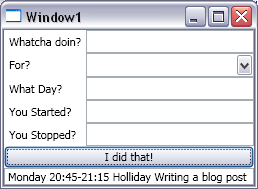
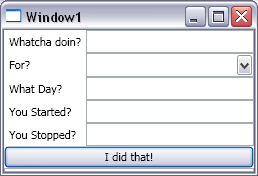
And some for some context, Meet Donny!
Donny

And, after I enter a task, Donny looks like this.
Donny

That’s really all there is to using Cucumber with IronRuby. Have fun!

Automatic, for the People

work safe

Confession, this is the album where I stopped listening to REM. Dunno why, because Monster was one of the best albums I never bought.

Let us review our strategy, especially referencing our usage of White. I find it interesting that Test Complete makes it so hard to “do the right thing” as propounded by both Scripting GUI Tests in Ruby and by White. And just what is that?

The responsibility of the test script is to

  • perform a series of actions and verifications.
  • allow someone to read the script and understand what the hell is going on.

The first is a gimme. The second is interesting. When I have my developer hat on, I believe code is read more often then it is written. Wearing my manual tester hat, I believe the scripts should be clear and show intent. Tricky scripts are trouble. They are also a pain to maintain. So, if automated testing the meeting of these two worlds, the clarity and intent of the scripts must be sacrosanct. The libraries the scripts use, on the other hand, just need to be treated like code and kept maintainable.

What do I want my test scripts to look like? There are two options, DSL, or clearly abstracted test code.

First, lets look at DSLs, Baby! WAHOOO! Tests that double as manual tests!

open sekrit with New Document
insert image "picture.png" into sheet
first image item should match stored image "stored_0001.png"

I could do that. I could use some functional programming language. I could also use something like cucumber and code behind my feature files. But what’s the point? All I need is clarity, so the auditors / business people understand. I LIKE dsls, but this buys us nothing right now.

Option two uses Objects to clarify the application.

sek = Sekrit.open( :New_Document )
doc = sek.document

doc.add_image("picure.png")
Assert.equal doc.images[0].as_bitmap, Stored.images["0001.png"]

This is at the proper level of abstraction for a slightly motivated business user to understand. What they don’t care about at this level is the control hierarchy and control manipulation. Unless the requirements say, “via a popup menu” or some such.

If you’re going to be technical, this is a facade. It’s a wrapper to the complex underbelly of the white framework. It allows for a higher level use of the collected objects and re-use as we don’t have to repeat the code for complex actions and interactions. It also decouples our tests from changes in our application. I’ve had to chase that down in our current automation set, and I hate it.

How do we build up this abstraction? To be compatible with White’s recommended practices, I’m going to call this facade a “Screen”. We’re going to write a test for an application for which we have no source. Download blu and warm up your tweetin’ fingers. We’re going to log in!

# our screens
class Blu
  def initialize(application, window)
    @app = application
    @win = window
  end
  def login_screen
    return LoginScreen.new(@app, @win)
  end
end
class LoginScreen
  def initialize(application, window)
    @app = application
    @win = window
  end
  def login_user( username, password, remember = false)
    @win.get_textbox("UsernameTextBox").enter username
    @win.get_textbox("PasswordTextBox").enter password
    rem = @win.get_checkbox("Rememberage")
    if rem.checked != remember
      rem.enter " "
    end
    @win.get_button("LoginButton").click
  end
end

You noticed that the BluScreen has a LoginScreen? Our application has regions and concepts to which we wish to refer. For example, we may want to represent a ribbon control, a toolbar, different types of documents, or even the clipboard.

How do we use these screens? Let’s flesh out this little story in Dan North “Story” format.

 As I malicious user, so I can't defame Brian's good twitter name,
   Given blu is open
   And no one is logged in
   When I attempt to log in using a bad password
   Then I should see a warning that my login information was incorrect
app = Application.attach("blu")
win = app.get_window("blu")

blu = Blu.new(app, win)
login = blu.login_screen
login.login_user( "Myotherpants", "NoWai!" )

# A test would have assertion here...

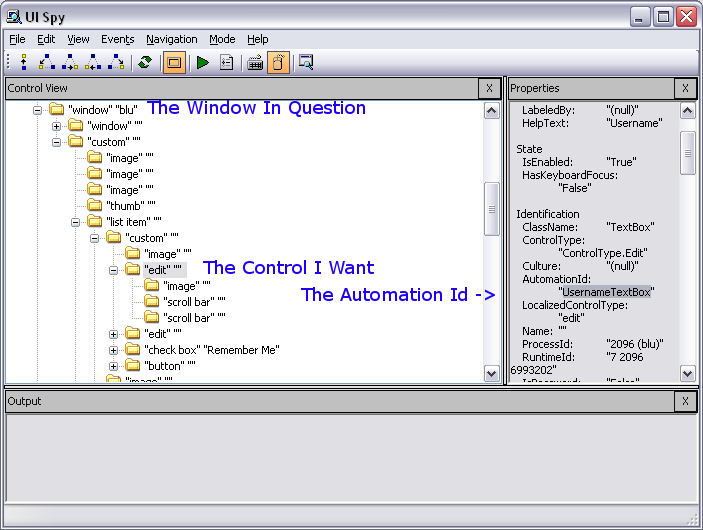
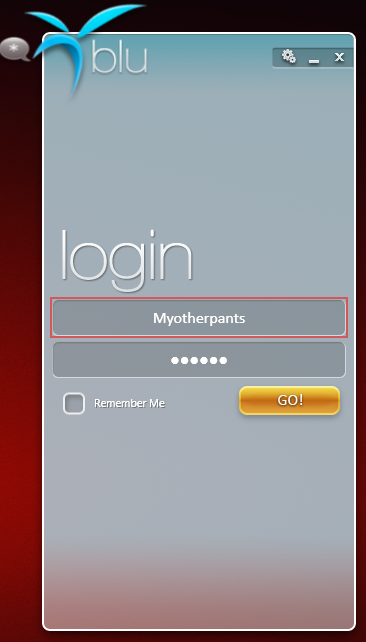
I’m holding out on you. The truth of the matter is, I started with the test steps first, then made screens that abstracted those steps. But there’s magic in the screens, they have magic strings passed around like @win.get_checkbox("Rememberage"). Where did that come from? I got it from UISpy. I’ve read about Woodstock, Snoop, and a few other tools, but UISpy is the only tool I used for this post. It is in the Windows SDK. UISpy shows a tree of controls. When you click on one, it hilights it with a red box. It also displays information such as the automation Id, those magic strings we have scattered in our code. Before my two picture tutorial on UISpy, let me note, those strings are what’s likely to break your script in the future as your application grows.

UI Spy looking at a textbox

UI Spy looking at a textbox

Blu when UISpy is indicating a textfiled

Blu when UISpy is indicating a textfiled

what else is there?

These aren’t tests, they are automation. I’ll eventually wrap the automation with RSpec and get some real tests. I’ll get to Cucumber. I’ll publish examples. I promise.

But next, I want to address three types of custom controls:
User controls, Inhereited and Templated Controls, and Framework Elements. Another problem is finding un-named controls. I’ll see you next week.

One last bit, here’s what the white ruby library is starting to look like.

white_loc = (File.dirname(__FILE__) + "\\White_Bin\\")
$LOAD_PATH.push(white_loc)
require "White.Core.dll"

Application = Core::Application
Button = Core::UIItems::Button
CheckBox = Core::UIItems::CheckBox
TextBox = Core::UIItems::TextBox
Window = Core::UIItems::WindowItems::Window
SearchCriteria = Core::UIItems::Finders::SearchCriteria

class Window
  def get_button(*args)
    self.method(:get).of(Button).call(*args)
  end
  def get_button_labeled(label)
    self.get_button(SearchCriteria.by_text(label))
  end
  def get_checkbox(*args)
    self.method(:get).of(CheckBox).call(*args)
  end
  def get_textbox(*args)
    self.method(:get).of(TextBox).call(*args)
  end
end

Generic White Rubies are Open

work safe

I’ve been continuing my exploration of IronRuby and White for gui testing. I expected to deal with Automation IDs first, but I’ll get back to that. For now I’m tying IronRuby to White, and handling generics.

My install of white is not in the GAC, so I’ll be requireing DLLs from a directory. DLLs are looked for in ruby’s $LOAD_PATH, just like ruby libraries. It’s an array. You’ll notice that White suggests also including an NUnit dll, but I’ve not needed that with RSpec. And, I want to shorten the namespace stuff. So let’s start with white.rb and we’ll add to it later.

white_loc = "C:\\Projects\\Libs\\White_Bin_0.18"
$LOAD_PATH.push(white_loc)
require "White.Core.dll"
Application = Core::Application

So, next we just start using the application. I want to launch my application, conviniently called “sekrit.” I need to find the window titled “Sekrit (version 0.5)”. Then I need to call the C# method win.Get<Button>("Open") but that uses generics that ruby doesn’t have. Using what I learned from a Stack Overflow post how to invoke an overloaded generic method in ironruby, we can work around that in IronRuby 0.5.

require 'white'
app = Application.launch("c:\\projects\\sekrit\\build\\sekrit.exe")
win = app.get_window("Sekrit (version 0.5)")
win.focus
win.method(:get).of(Core::UIItems::Button).call("Open")

Oh, lawdy! Did you see that last line? It ain’t pretty. This is something we’ll be doing a lot of, so let’s wrap that up. I need to add, essentially, a non-generic extention method to wrap the generic call. But, do it with Ruby to extend a .NET class. Back to white.rb for some open class magic.

class Core::UIItems::WindowItems::Window
  def get_button(*args)
    self.method(:get).of(Core::UIItems::Button).call(*args)
  end
end

Now that cleans up our earlier program.

require 'white'
app = Application.launch("c:\\projects\\sekrit\\build\\sekrit.exe")
win = app.get_window("Sekrit (version 0.5)")
win.focus
win.get_button("Open")

Okay, one more problem. I talked about RSpec, but that’s because I hacked my install. There’s a known bug in IronRuby 0.5’s implementation of File.expand_path(file_name) that uses the .NET System::IO::Path methods that throws execptions when you try to expand a path with “:8” on the end to help track line numbers. I don’t know yet if it’s been fixed. If not, that may be another post.

So, what’s left? RSpec doesn’t run out of the box. I need to wrap some stuff up so I can say app.open_file("some_file.ext") and other higher level “user action” concepts (those shouldn’t be in white.rb, but sekrit.rb). I need to handle finding controls quickly and easily. I’ll take a look at that this weekend and see what I can find. Especially, since I’ll be hanging with a WPF MVP both this evening at IndyALT.NET and on Saturday.

Thoughts on GUI Testing

work safe

I’m currently involved with a WPF project as a tester. My charge is to automate the System-Level testing of this project for my client. Our belife is that automated testing allows us to find “popup bugs” before they become a problem. This has worked well, in combination with the team doing a degree of dog-fooding. They catch the esoteric things, I find the simple things no one looks for. Also, I’m currently working with a lot of them as we build manual test scripts for our verification phase. This is a lot more focused act that, once automated as we move forward with version two, will allow us to have a better understanding of the “shipability” of our software. We’re regulated and we want to automate most of the acceptance testing, at least in theory.

I’ve been using TestComplete for this. T.C. is good stuff, but there are some things about it I don’t like. It’s meant for recording and playback of tests. But, to automate in a regulated situation, I don’t want to see javascript (T.C.’s CSharp script is a horrible trap, don’t go there) like the following

var p1;
var w1;
p1 = Sys.Process('MyProcess');
w1 = p1.Window('HWind: MainWindow').MainWindow.Base.WPFObject('Grid', '', 1).ScrollView;
w1.x = 0;
w1.y = 0;
w1.WPFObject('RowItem', '', 2).StackPannel.WPFObject('Button', 'Cancel', 1).Click(3,15);

What the hell is my intent here? Also, I’m crawling the visual tree, which may be brittle. The renaming of internal variables, like “StackPannel” to something more revealing like “VisibleFlarns,” I’d have to go edit this test. And a buch of other tests that traverse that point in the tree. We kind of saw this coming and have rewritten our tests to a degree.

var process = Sys.Process('MyProcess');
VisibleFlarn(process, 2).WPFObject('Button', 'Cancel', 1).Click();

This is slightly more clear. The main benefit is that we’re hiding the traversal of the tree to the visible flarns. That means we only have one place to hunt down our changes to the tree. But it doesn’t take full advantage of our environment, JavaScript. Foreign objects, like the process, windows, and buttons can’t be extended with helper methods. So, I’ve started the next round of testing with a bunch of decorators and strict reuse.

var process = new MyProcess();
process.GetVisibleFlarn(2).Cancel();

That’s starting to get to good. The last piece is that regulatory oversight loves positive passing of tests, not just error logs. T.C. doesn’t have that. T.C. doesn’t even really have asserts. You can only error, or log. In fact, I’ve yet to find a test framework that does that out of the box. Even those that assert, don’t log positive asserts. Why is this important? I want to be able to say Req-123 was tested 7 times, and passed each one. That’s what the oversight wants. They fear, “Well, it’s didn’t show up in the error logs, so I’m assuming it worked.” So, I wrote some asserts that take explicit requirements and “Why” I’m asking about that.

Now, on to prong two, of my assault.

I recently picked up “Scripted GUI Testing with Ruby” by Ian Dees as I visited my local book store. I like the book. It covers using Win32API to grab window handles and throw around events. Oh, it’s also got some crap about Jruby and an apple-talk bridge if you want to go that route. Basically, it covers testing on all the platforms that aren’t X11 or .NET. That doesn’t detract from the book’s handling of GUI testing strategy, but I want to fill in that gap.

The CLR has a pretty good testing story, for WPF at least, in the White testing framework from ThoughtWorks. It uses Automation Ids to identitfy and find all of your controls. So, the pieces I’m looking at are, “What are Automation Ids,” and “What are their best practices?” Couple that with a running example of using IronRuby to get my hands on the application and bang it around. The big deal is our current project doesn’t use Automation Ids (accessibiltiy isn’t a huge driving need), so I need to show some benefit and low risk.

What am I going to have to do, for this experiement? I’m, currently, only interested in rSpec and don’t need cucumber. I’ll start by using White directly, but I’m guessing I’ll be wrapping it some. I’m also interested in alternatives to AutomationIds. But I’ll need to wrap the standard asserts with something that positively checks asserts against requirement numbers.

Will the regulators go for this? I don’t know. When working in a regulated environment, you can be innovative with how you handle testing as long as the auditors are comfortable with your ability to be repeatable and cover what they find important.

Should be fun.